Introduction to cypher
neo4j graph database cypher
Introduction
Cypher is the query language you use to retrieve data from the Neo4j Database.
After reading this article, you are expected to understand how to:
- Retrieve nodes from the graph.
- Retrieve nodes with a particular label.
- Filter the retrieval by a property value.
- Return property values.
- Retrieve nodes and relationships from the graph using patterns in the graph.
- Filter queries
Data Model
The examples shown in this article will be using the data model shown in the image below.
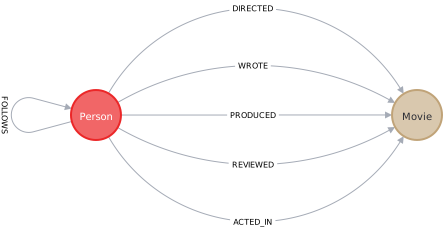
Elements of A Cypher query
- Nodes are represented by parentheses
()- The label of the node is specified by a colon
:followed by the label name. For example,(:Movie) - Nodes can be given an alias by specifying the alias before the colon
:. Example:(m:Movie) - Filtering node properties can be done by specifying a property name and a value to match in JSON like syntax. Example:
(m:Movie {title: "The Matrix"})
- The label of the node is specified by a colon
- Relationships between nodes are written with two dashes, for example
(:Person)--(:Movie).- The direction of a relationship is indicated using a greater than or less than symbol
<or>, for example(:Person)-→(:Movie) - The type of the relationship is written using the square brackets between the two dashes:
[and], for example[:ACTED_IN] - Similar to nodes, filtering on properties are done by specifying a property name and a value to match in a JSON like syntax. Example:
[:ACTED_IN{year:2020}] - By default the depth defined in traversal will be 1. However, this behavior can be overwritten by writting a star followed by the depth you are expecting afer the relationship type. Examples:
[:ACTED_IN*2](traverse for depth = 2)[:ACTED_IN*..4](traverse for depth between 0 and 4)[:ACTED_IN*2..](traverse for depth larger than 2)[:ACTED_IN*..10](traverse for depth less than 10)[:ACTED_IN*](traverse for unlimited depth)
- The direction of a relationship is indicated using a greater than or less than symbol
A simple cypher query will look like this:
MATCH (m:Movie {title: 'Cloud Atlas'})<-[:ACTED_IN]-(p:Person)
RETURN p.name
The query above will return the name of Person’s who acted in the Movie titled Cloud Atlas.
Clauses in Cypher
Clauses for reading data
In the cypher query sample above, you’ve seen the clause MATCH and RETURN. But what does those clauses do? The list below will explore the clauses in cypher and what does each keyword do.
MATCHretrieve node(s)RETURNreturn the specified after the clause (In the cypher query sample above it returns the person’s name). This behavior is similar to SQL’sSELECTclauseWHEREfilter node/relationships based on their properties and/or relationship/graph directions. Other clauses which usually follows theWHEREclause includes:ISNOTconverts aTRUEstatement toFALSEand vice versaNULLnullANDlogical and operatorORlogical or operatorSTARTS WITHused to filter strings starting with certain characters seqeunceENDS WITHused to filter strings ending with certain characters seqeunceCONTAINSused to filter strings containing certain characters seqeunceINchecks if an entity is in an list- and many more
Clauses for writing data
Create Node/Relationships
CREATEcreates a node/relationshipMERGEcreates a node/relationship while avoiding creating duplicates. A cypher query using theMERGEclause to create a node will look like this:
Optionally, you can return the newly created node by adding theMERGE (p:Person {name: 'Michael Cain'})RETURNclause to the query. For example:
A cypher query using theMERGE (p:Person {name: 'Michael Cain'}) RETURN pMERGEclause to create nodes and relationships between them will look like this:MERGE (p:Person {name: 'Emily Blunt'})-[:ACTED_IN]->(m:Movie {title: 'A Quiet Place'}) RETURN p, m
The clause to read data can also be chained with the clauses for creating node/relationships such as:
MATCH (p:Person)
WHERE p.name = "Daniel Kaluuya"
MERGE (m:Movie{title:"Get Out"})
MERGE (p)-[:ACTED_IN]->(m)
Updating properties
In the section above you’ve seen how to create a node property on creation. But what about updating a property of a node that already exists?
In order to do that cypher uses the SET clause.
MATCH (p:Person)-[r:ACTED_IN]->(m:Movie)
WHERE p.name = 'Michael Cain' AND m.title = 'The Dark Knight'
SET r.roles = ['Alfred Penny'], r.year = 2008
RETURN p, r, m
or
MATCH (m:Movie {title: 'Get Out'})
SET m.tagline = "Gripping, scary, witty and timely!", m.released = 2017
RETURN m.title, m.tagline, m.released
Removing Properties
There 2 ways to remove a property. First, is by using the REMOVE clause.
MATCH (p:Person)-[r:ACTED_IN]->(m:Movie)
WHERE p.name = 'Michael Cain' AND m.title = 'The Dark Knight'
REMOVE r.roles
RETURN p, r, m
Next, is by setting the property to null
MATCH (p:Person)
WHERE p.name = 'Gene Hackman'
SET p.born = null
RETURN p
Conditional Property Updating
Up to this point, you’ve seen how to create a node along with it’s properties and updating a node’s properties.
However, there are other cases where you want to create only certain node properties during node creation or update the node properties if it already exist. Enter, the ON CREATE SET and ON MATCH SET clauses. When a MERGE clause is followed by an ON CREATE SET clause, it will only create the properties defined after the ON CREATE SET. Following the whole cypher query with the ON MATCH SET will update the properties only when the node already exists in the database.
// Find or create a person with this name
MERGE (p:Person {name: 'McKenna Grace'})

// Only set the `createdAt` property if the node is created during this query
ON CREATE SET p.createdAt = datetime()

// Only set the `updatedAt` property if the node was created previously
ON MATCH SET p.updatedAt = datetime()

// Set the `born` property regardless
SET p.born = 2006

RETURN p
Deleting Node/Relationships
To delete nodes/relationships, there are 2 clauses.
DELETE- Node deletion
MATCH (p:Person) WHERE p.name = 'Jane Doe' DELETE p - Relationship deletion
MATCH (p:Person {name: 'Jane Doe'})-[r:ACTED_IN]->(m:Movie {title: 'The Matrix'})
DELETE r
RETURN p, m
- Node deletion
DETACH DELETEDeletes one or multiple node(s) along with all relationships connected to that node
or the following cypher query to delete all nodes in the database:MATCH (p:Person {name: 'Jane Doe'}) DETACH DELETE pMATCH (n) DETACH DELETE n